
How to Generate SSH Keys on Windows using PuTTY Download
In order to Generate an SSH Key on Windows, you will need to download PuTTY. PuTTY is a free SSH and telnet client for Windows.
PuTTYgen is a robust SSH key pair generation tool that comes via PuTTY Download that will help you to generate an SSH-2 RSA key pair. This is the type of SSH key needed to access a Clouder VPS with SSH.
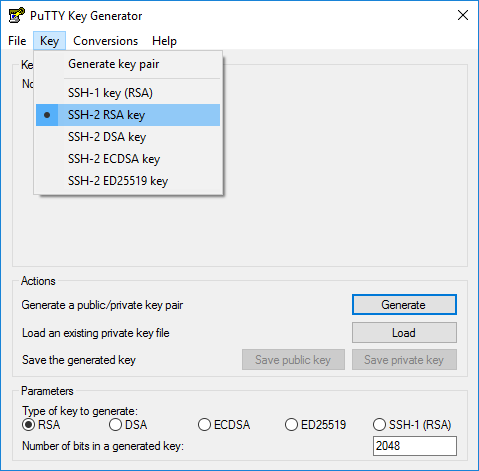
Be sure to Save your private key!
If you're using putty, you'll need to specify the private key when you're logging in, as follows:
1. In the putty connection configuration screen, expand Connection -> SSH -> Auth

2. Click the Browse button, and select your previously-created private key
3. Return to the Session Category. Name and save the session for easy future access.
How to Generate SSH Keys on Mac OS X & Linux
1. Search for and Launch the Terminal app.
2. Enter the following code and press enter:
ssh-keygen -t rsa3. Press ENTER to store the key in the default folder /Users/Username/.ssh/id_rsa).
4. Type a passphrase (characters will not appear in Terminal).
5. Confirm your passphrase to finish SSH Keygen. You should get an output that looks something like this:
Your identification has been saved in /Users/myname/.ssh/id_rsa.Your public key has been saved in /Users/myname/.ssh/id_rsa.pub.The key fingerprint is:ae:89:72:0b:85:da:5a:f4:7c:1f:c2:43:fd:c6:44:30 myname@mymac.localThe key's randomart image is:+--[ RSA 2048]----+| || . || E . || . . o || o . . S . || + + o . + ||. + o = o + || o...o * o ||. oo.o . |+-----------------+
6. Copy your public SSH Key to your clipboard using the following code:
pbcopy < ~/.ssh/id_rsa.pub7. Use ctrl+v or right-click and paste to paste your public SSH Key where it needs to go!
